
Consider Using an Inactive Tree to Manage Long-term Absences
Keep Long-term Inactive and Deleted Customer Records Intact by Moving Them to a Different Tree
Questions:
- How can I retain the record of a deleted customer or for someone on an extended break?
- Why would I not want to delete the records of a customer with a Deleted status?
- Can I create a separate tree structure in any of my trees?
- When would I want to retain the records of someone who left the company?
- How can I manage the records of those on an extended break from the company?
Main Points:
- At times, someone might require a break from the business without losing their hierarchy in their genealogy trees. Reasons could be personal, family, or other work-related issues.
- To keep their records intact but remove them from the flow of commission calculations, you can build a separate tree structure within the same tree. Simply create a new record without an upline sponsor and name it “Top of Inactive Tree” or something similar. You can move any record under that record temporarily or permanently.
- If and when the person returns to full business activity, simply move them back to their original place in your original tree structures.
Explanation:
People may leave your organization for a host of reasons, sometimes hoping to return when a situation in their life is resolved. Say you have a field leader that needs to be inactive for an extended period but wants to return to full active status in several months without losing their hierarchical downline they’ve worked hard to build for earning commissions. You can handle these exceptions in a couple of ways depending on your tree structures, as well as the commissions and bonuses defined in your compensation plan:
- Set them to Inactive status and leave them placed in your normal tree structures.
- Create a second Top of Tree record without a sponsor within each tree defined in your compensation plan and use it to “store” inactive or deleted customers.
Use this strategy for removing people from the main trees if you think they will return to full activity in your business. If you move them to another tree, their records will stay intact. If or when they return, you can simply move them back into their original positions in your main trees to resume their previous hierarchy. If you use this strategy, consider the following points:
- If the Inactive customer status is set to forfeit commissions, they will not receive commissions; however, verify that leaving them in line in your trees will not confuse commissions for others in the flow of bonuses and regular compensation.
- If you move someone to an Inactive or Deleted tree hoping they return to activity at a future date, do NOT change their status to DELETED. Doing so will delete their name, address, email, etc., but leave a sterile record named “Customer XXXX” (where XXXX is their Customer ID) in the Active trees as a placeholder only, and upon their return, they will need to reregister as a new customer to recreate a new record.
- After you have moved them to the Inactive or Deleted tree, you may change their customer status to Inactive, but do not change it to Deleted unless you want to delete their record.
- Changing the customer status to Deleted will permanently delete the record as described in #1 above and cannot be undone by anyone. The record will be deleted from the master repository without undelete capability.
- If you move them to the Inactive tree where nobody is buying product and everyone is Inactive, they won't earn any commissions anyway because a) no one should be Active in the Inactive tree, and b) the Inactive customer status is set to FORFEIT commissions. At the most, change them from Active to Inactive after you move them to the Inactive tree, which will leave their record intact.
- Each tree in your compensation plan has a toggle to compress the tree once a status changes to Deleted. It is called Remove node from [tree name] and compress it. Edit that setting for each tree at Settings > Customer Statuses and click the pencil icon at the far right of the row. Think through your scenarios before setting this and using the Deleted status if you plan to use the Inactive or Deleted tree strategy.
Steps to Create a Top of Inactive Tree Record:
- Click on Recent Customers in your Pillars admin BackOffice.
- Append “/new” to the end of the URL:
https://_[yoursubdomain]_.pillarshub.com/customers/new - Add a new user named “Top of Inactive Tree.” (See Image 1 below.)
- Set their Customer Type as your desired type of customer.
- Set their Customer Status to Inactive.
- Leave the Sponsor field blank.
- Set their Contact Info and other fields as desired.
- Click Save at the bottom left.
- You will get an error because you left the Sponsor field blank. Just click OK. (See Image 2 below.)
- Click on All Customers and notice the new Top of Inactive Tree is now listed.
- Click on the new record and then click on the tree name in the left menu where you created it. (See Image 3 below.)
You can now move people from your main tree to this Inactive tree. This will keep their record intact. After moving them to the new Inactive tree, you may change their status to Inactive, which will forfeit them from earning any commissions or bonuses.
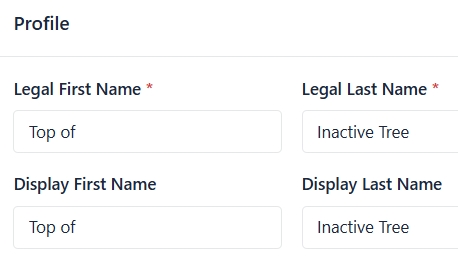
Image 1: Add a new user named “Top of Inactive Tree.”

Image 2: You will get an error because you left the Sponsor field blank. Just click OK.
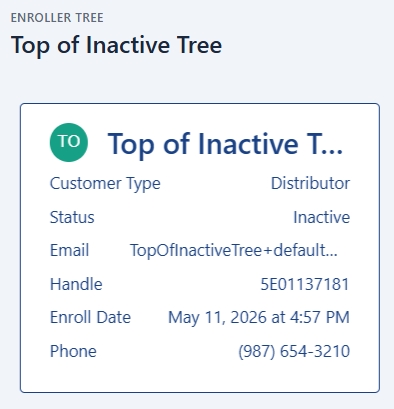
Image 3: Click on the new record and then click on the tree name in the left menu where you created it.
Updated 6 months ago